AI Commit Messages
Generate properly-formatted Git commit messages from your staged diff with one click. Available since FinderGit 0.5.0.
How to use it
- Stage the files you want to include in the commit (per-file Stage button or Stage All in the Changes header)
- The ✨ AI button appears next to the Commit heading in the detail panel — click it
- FinderGit reads
git diff --cached, sends it to the AI, and fills the commit message field with the suggestion (typically in under a second) - Edit the message if you want, then click Commit Staged
The button is disabled until you have something staged. While generating, a small spinner replaces the icon and the label switches to “Generating…”. Errors render as a dismissable inline orange banner inside the commit section, right next to the button that triggered them — never far from where you clicked.
Zero setup
The default mode is free and works out of the box. No signup, no API key, no Homebrew install, no pip install — open FinderGit and the button is there. FinderGit takes care of talking to the AI on your behalf.
Configuration
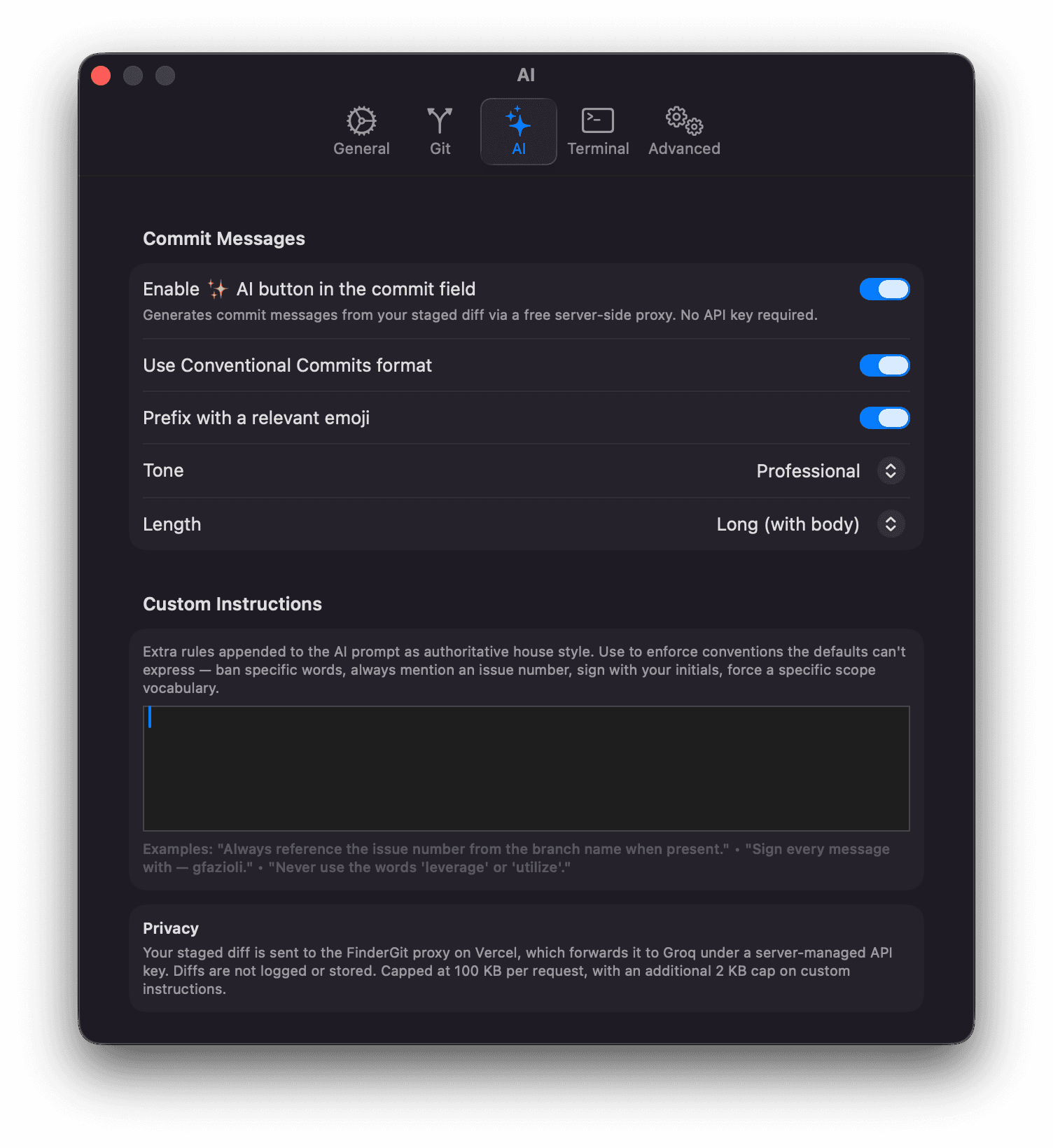
Open Settings → AI to tune the output to your style:
Enable ✨ AI button in the commit field
Master switch. Disable to hide the button entirely if you’d rather write commit messages by hand.
Use Conventional Commits format
When on (default), messages follow type(scope): subject — types include feat, fix, refactor, chore, docs, test, style, perf. When off, no prefix.
Prefix with a relevant emoji
When on, the model picks one emoji that matches the change and prepends it to the subject (e.g. chore: 📦 bump dependencies). Off by default.
Tone
Pick one:
- Professional — neutral, business-friendly (default)
- Casual — conversational, lighter
- Friendly — warmer, slightly less formal
Length
Pick one:
- Short (default) — single subject line under 60 characters
- Normal — subject under 72 characters, optionally followed by a brief one-paragraph body
- Long (with body) — subject, blank line, then a bulleted body where each
-bullet describes one change and its motivation. The de-facto OSS convention (Linux kernel, major GitHub projects)
Custom Instructions
Free-form textarea (max 2 KB) appended to the AI prompt as authoritative house style. Use it to enforce conventions the defaults can’t express. Examples:
Always reference the issue number from the branch name when present.
Sign every message with
— gfazioliat the end.
Never use the words ‘leverage’ or ‘utilize’.
For files in
tests/, always use thetest:Conventional Commits prefix even if afeat:would otherwise apply.
The custom rules override the defaults if they conflict — that’s by design: your house style beats the generic ones.
Examples
A small diff with Conventional on, Emoji off, Tone: professional, Length: short:
feat(networking): implement retry mechanismThe same diff with Length: long and Emoji on:
feat: 📦 bump dependencies

- Update Mantine packages to 9.1.1 for improved compatibility and bug fixes.
- Upgrade Storybook to 10.3.6 to include the latest UI enhancements.
- Bump oxlint, postcss, and rollup to newer patch releases for stability.
With Custom Instructions: "Sign every message with — gfazioli":
fix(parser): handle empty input gracefully

— gfazioli
Privacy & limits
Your staged diff is sent to the AI in-flight only — diffs are not logged or stored. No personal credentials are required: FinderGit handles the request on your behalf.
| Limit | Value |
|---|---|
| Max diff size per request | 100 KB |
| Max custom instructions length | 2 KB |
| Rate limit | 30 requests / hour per IP |
If you stage more than 100 KB of diff, the AI button surfaces an inline message asking you to stage fewer files — typically a sign that the commit is large enough to deserve splitting into multiple commits anyway.
If you hit the per-IP rate limit (rare in normal use), the error banner shows a retry-after hint.
Troubleshooting
- Button is disabled — nothing is staged. Stage at least one file.
- “AI provider is temporarily unreachable” — transient network glitch or warm-up delay. Click the × to dismiss the banner and retry; usually works on the second attempt.
- “Diff too large (max 100 KB)” — stage fewer files, or split the change into multiple commits.
- “Hit the AI rate limit” — wait the indicated number of seconds and try again. The 30/hour limit resets per IP.
Coming next
The current implementation is Phase 1: the free zero-setup mode that just works. Phase 2 (planned) adds Bring Your Own Key support — pick your preferred AI provider, supply your own API key (stored in macOS Keychain), and FinderGit calls that provider directly. Useful for privacy-sensitive repositories or to bypass the per-IP rate limit on the free tier.